Cortext5.0.9
Publisher Description
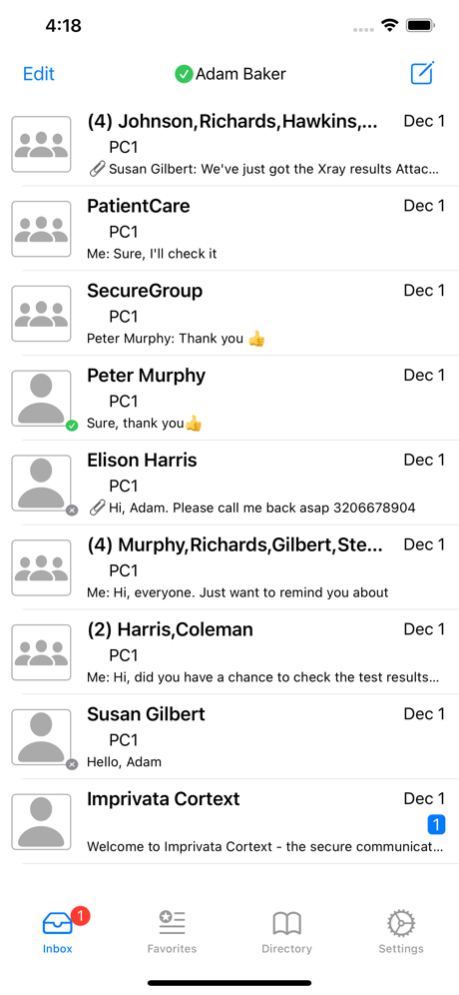
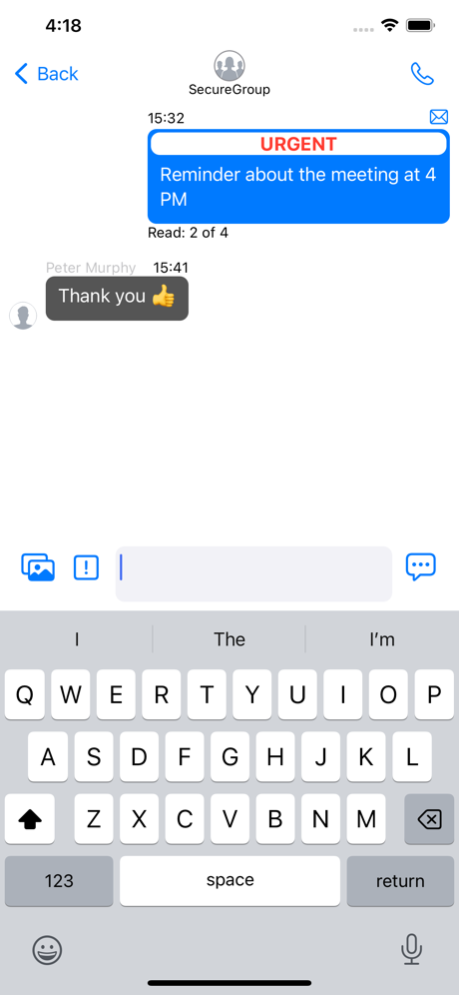
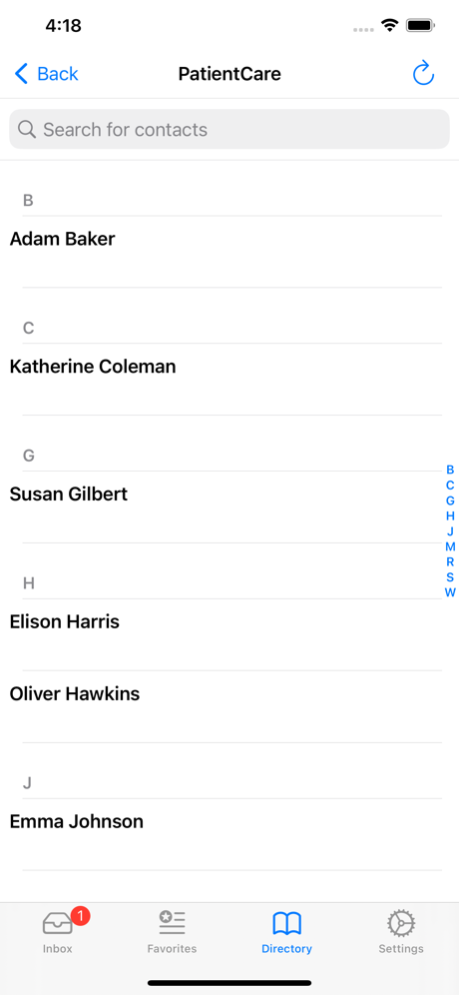
Imprivata Cortext® is the secure communications platform for healthcare that facilitates care coordination by allowing physicians, nurses, and patients to connect, communicate, and collaborate securely from any workstation or mobile device.
Imprivata Cortext enables healthcare organizations to:
• Improve care coordination
• Optimize clinical communication workflows
• Improve patient safety and satisfaction scores
• Secure patient information with a HIPAA-verified solution
Key Clinical Features:
• Secure text, photo & group messaging
• Multi-site communication
• Multi-device message sync
• Delivery and read receipts
• User-set customizable Availability status
• Speech-to-text support for dictation
• Quick responses and callback requests
• Out-of-Network messaging to affiliated providers
• Clinical system integration
• Distinguish urgent notifications from non-urgent notifications through audio and visual treatments.
Key Administrative & Security Features:
• Active Directory authentication
• Single Sign-On integration
• Verified for HIPAA compliance by 3rd party
• 256-bit Encryption in transit and at rest
• Remote Wipe & App PIN enforcement
Aug 2, 2023
Version 5.0.9
Imprivata Cortext for iOS 5.0.9 makes the app more reliable and fixes several issues.
• Improved performance when launching and loading the inbox
• Prevents a possible crash while typing a message
• Prevents duplicate conversations and “unaffiliated” users when sending cross-tenant messages from iPhone to Desktop clients
• Improved performance when opening group chats with many messages
• Improved performance deleting messages
• “Sent” message counts are now accurately reported in the Cortext Reporting Portal.
About Cortext
The company that develops Cortext is Imprivata, Inc.. The latest version released by its developer is 5.0.9.
To install Cortext on your iOS device, just click the green Continue To App button above to start the installation process. The app is listed on our website since 2023-08-02 and was downloaded 23 times. We have already checked if the download link is safe, however for your own protection we recommend that you scan the downloaded app with your antivirus. Your antivirus may detect the Cortext as malware if the download link is broken.
How to install Cortext on your iOS device:
- Click on the Continue To App button on our website. This will redirect you to the App Store.
- Once the Cortext is shown in the iTunes listing of your iOS device, you can start its download and installation. Tap on the GET button to the right of the app to start downloading it.
- If you are not logged-in the iOS appstore app, you'll be prompted for your your Apple ID and/or password.
- After Cortext is downloaded, you'll see an INSTALL button to the right. Tap on it to start the actual installation of the iOS app.
- Once installation is finished you can tap on the OPEN button to start it. Its icon will also be added to your device home screen.
Program Details
System requirements
Download information
Pricing
Version History
version 5.0.9
posted on 2023-08-02
Aug 2, 2023
Version 5.0.9
Imprivata Cortext for iOS 5.0.9 makes the app more reliable and fixes several issues.
• Improved performance when launching and loading the inbox
• Prevents a possible crash while typing a message
• Prevents duplicate conversations and “unaffiliated” users when sending cross-tenant messages from iPhone to Desktop clients
• Improved performance when opening group chats with many messages
• Improved performance deleting messages
• “Sent” message counts are now accurately reported in the Cortext Reporting Portal.
version 5.0.8
posted on 2022-12-07
Dec 7, 2022
Version 5.0.8
• CC-18080 Cortext will now automatically refresh the user directory approximately every 24 hours. This includes name updates, phone number changes, remove deleted users, etc.
• CC-17889 We have updated to the most recent Nuance speech-to-text library. This change now allows interaction with the three-lined “hamburger” menu to access Nuance options. It also increases compatibility with the latest versions of iOS.
• CC-17591 Resolved certain “Phantom notifications” for messages that had already been read. A server-side change in November will resolve additional phantom notifications.
• CC-16243+ Resolved several issues where two conversations were created when sending messages to a group.
• CC-17038 Resolved a crash when trying to save a name as a favorite.
• CC-16955 Resolved an issue where the incorrect tenant name was displayed in a user search.
version 5.0.6
posted on 2022-07-25
Jul 25, 2022 Version 5.0.6
Improvements in version 5.0.6:
• No longer shows “Message not set” when the message was sent
• Partial name searches now work as expected — e.g. a search for “Ken G” will find “Kenny G”
• More consistently connects when tapping on a push notification
• Read Timestamps are now available for 1:1 messages
• The text view now allows more text when using dictation
• [CC-17602] App recovery codes work again
• [CC-17572] Message notification sounds no longer continue to alert after opening Cortext
version 5.0.5
posted on 2022-05-16
May 16, 2022 Version 5.0.5
Improvements in 5.0.5
• Messages are sent and received much more reliably.
• Cortext should no longer show a blank screen when launching.
• Several crashes have been fixed.
• The message “Loading Directories” should no longer show unexpectedly.
• Group message threads should display as expected.
• Improvements to the integration with SCAL OnCall.
• Users may pull down on the Inbox to force message retrieval.
• Cortext should be much more responsive if using Nuance dictation. To begin dictation, please tap the red microphone icon. You may return to the former “Always Listen” mode in Settings > Cortext.
Known Issues
• Users who have many images in their history may have trouble loading Cortext. We are researching this issue.
• Users should remain in Cortext when sending messages with large attachments, until the message status shows the message sent icon. Switching apps may result in a delay in message delivery.
version 5.0.2
posted on 2022-03-12
Mar 12, 2022 Version 5.0.2
We are pleased to announce the release of the Imprivata Cortext 5.0 for iOS devices. Cortext 5.0 for iOS is completely rearchitected, new-look client taking advantage of the latest advancements in the platform.
* Enhanced integration and compliance with Apple iOS platform
* Features a native design and implementation that follows Apple’s Human Interface Guidelines
* Support for iOS Dark Mode for improved viewing experience in low-light environments
* New AppDynamics integration provides upgraded error tracking and logging with automatic trace collection
* Support for updated Nuance SDK
* The new architecture improves application stability and battery life
* Improved application navigation with enhanced animations between screens
* Encrypted on-device database, provides better security and privacy
* Expanded support for landscape and portrait mode
Version 5.0.2 includes a fix for Inter-Application URLs.
version 4.4.1.4411530
posted on 2020-02-11
11 Feb 2020 Version 4.4.1.4411530
•Reliability and Usability
•Improve the synchronization of Do Not Disturb and Availability status between Imprivata Cortext Desktop Client and Imprivata Cortext iOS Mobile applications
•Changes to address redundant notifications for some messages sent through the Imprivata Cortext API from other paging systems
version 4.4.1.4411530
posted on 2020-02-11
Feb 11, 2020 Version 4.4.1.4411530
•Reliability and Usability
•Improve the synchronization of Do Not Disturb and Availability status between Imprivata Cortext Desktop Client and Imprivata Cortext iOS Mobile applications
•Changes to address redundant notifications for some messages sent through the Imprivata Cortext API from other paging systems
version 3.8.0.361170
posted on 2012-07-11
version 4.4.1.4411530
posted on 1970-01-01
2020年2月11日 Version 4.4.1.4411530
•Reliability and Usability
•Improve the synchronization of Do Not Disturb and Availability status between Imprivata Cortext Desktop Client and Imprivata Cortext iOS Mobile applications
•Changes to address redundant notifications for some messages sent through the Imprivata Cortext API from other paging systems
version 4.4.1.4411530
posted on 1970-01-01
11 févr. 2020 Version 4.4.1.4411530
•Reliability and Usability
•Improve the synchronization of Do Not Disturb and Availability status between Imprivata Cortext Desktop Client and Imprivata Cortext iOS Mobile applications
•Changes to address redundant notifications for some messages sent through the Imprivata Cortext API from other paging systems
